Automate Repetitive Work Without Losing Operational Control

Combine business rules, APIs, document processing, AI assistance, and human approvals to make routine workflows faster, more consistent, and easier to track.

Rulesand AI
APIsand Data
ApprovalControl
Business process automation workflow

Start With the Process, Not the Automation Tool

Automating an unclear or inconsistent process can reproduce its problems at greater speed.

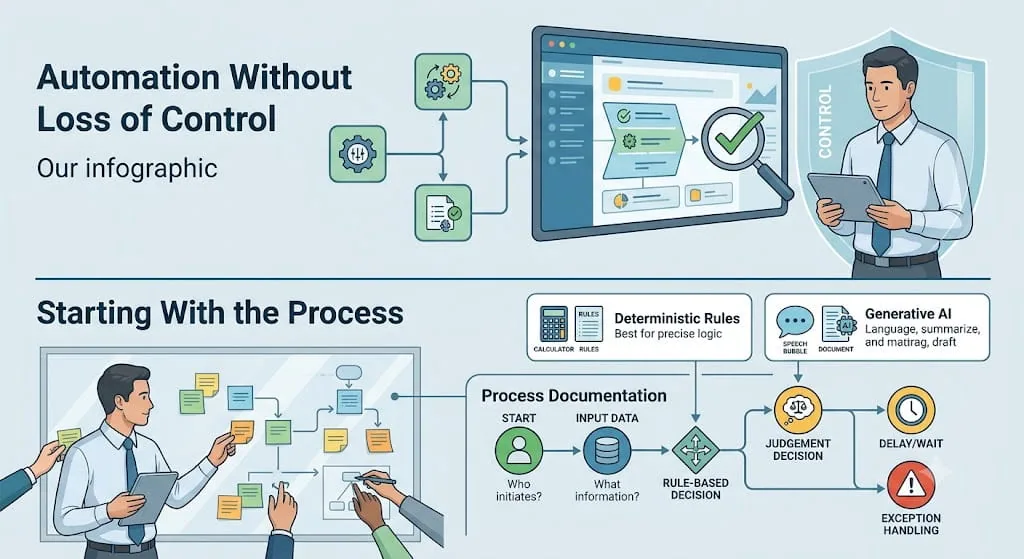
MayilVeera begins by documenting who initiates the workflow, what information is required, which decisions follow fixed rules, which decisions require judgement, where delays occur, and how exceptions are managed.

Deterministic rules remain preferable when decisions can be expressed precisely. Generative AI is used where language, documents, summarisation, or assisted drafting are involved.

Processes We Can Help Automate

Automation is designed around your existing teams, systems, exceptions, and approval responsibilities.

Document Intake and Classification

Process enquiries, purchase requests, inspection records, service forms, supplier documents, quality documents, delivery documents, maintenance reports, technical reports, and customer-submitted forms.
Customer Enquiry Processing

Capture customer details, classify the requirement, identify the responsible department, extract needs, prepare a requirement checklist, draft acknowledgement, assign tasks, and track response status.

Support Ticket Automation

Improve service workflows with ticket categorisation, priority suggestions, product and issue identification, duplicate detection, knowledge retrieval, response drafting, assignment, escalation, reminders, and closure summaries.

Service and Maintenance Workflows

Support service-request intake, equipment identification, symptom collection, manual retrieval, technician assignment, visit preparation, service-report drafting, action tracking, and closure documentation.

Inspection and Quality Workflows

Extract inspection information, check missing fields, classify defects, group recurring issues, prepare non-conformance summaries, route records, track corrective actions, and generate draft reports.

Email and Communication Assistance

Classify messages, extract action items, identify responsible users, draft replies, create follow-up reminders, summarise conversations, associate messages with records, and route sensitive messages for review.

Workflow Architecture

A controlled automated workflow normally includes a trigger, validation, processing, human review, approved execution, exception handling, and an audit record.

Workflow trigger

Input validation

Rules and AI processing

Human review

Approved execution

Exception handling

Audit record

System integration

Our Automation Delivery Method

A practical delivery path helps test the workflow before expanding scope.

Process Discovery

Document the workflow, people, systems, data, delays, exceptions, approvals, and compliance requirements.

Automation Assessment

Classify each step as manual, automatable, rule-based, AI-assisted, approval-controlled, exception-driven, or unsuitable for automation.

Pilot Design

Select one bounded workflow with measurable inputs, outputs, and acceptance criteria.

Integration

Connect required approved systems, files, APIs, databases, communication channels, or forms.

Validation

Test expected cases, incomplete inputs, duplicates, incorrect information, integration failures, permissions, and exception paths.

Controlled Rollout

Begin with a limited user group and retain manual fallback until performance is understood.

Monitoring

Measure processing time, exception rate, correction rate, user acceptance, unsuccessful cases, and workflow value.

Deliverables Can Include

Benefits should be measured during the pilot rather than promised through generic percentage claims.

01Current workflow map
02Automation assessment matrix
03Pilot workflow definition
04Input and validation rules
05AI-assisted drafting or classification flow
06Human approval model
07Integration requirements
08Exception handling design
09Audit and traceability fields
10Validation test cases
11Controlled rollout plan
12Monitoring and improvement metrics

Frequently Asked Questions

Q

Does every business process need AI?

A

No. Many workflows are better handled using rules, forms, databases, and API integration. AI is introduced only where it adds practical value.

Q

Can automation work with existing applications?

A

Potentially, yes. We first assess whether applications provide APIs, database access, approved exports, webhooks, or other supported integration mechanisms.

Q

What happens when the AI is uncertain?

A

The workflow should send the case to a human with available source information rather than silently guessing.

Q

Can the system automatically send emails or update records?

A

Yes, if authorised. Sensitive or externally visible actions should include approval, validation, and audit controls.

Q

Can we automate a spreadsheet process?

A

Yes. We first determine whether the spreadsheet should remain the long-term data source or move into a controlled database or business application.

Q

How should we select the first workflow?

A

Choose a repetitive, documented, stable, measurable workflow that is important enough to provide value without being safety-critical.

Identify Your First Automation Opportunity

Share the current process, people involved, documents used, systems accessed, monthly volume, common delays, exceptions, and approval requirements.

Request a Process Automation Assessment
Find us

MayilVeera Tech Solutions and Consultancy

Visit or contact our Chennai team for industrial automation, embedded systems, product engineering, IIoT, and connected-device discussions.

Open in Maps